A free, visual canvas for storytellers

Build the whole story
on one canvas.

Beat is a visual, node based space for writing stories and organizing every idea that builds them: beats, references, characters, and the look of each scene. I made it because I think in pictures as much as in words.

Download for Mac, free See the Set Plan

Completely free. Not for sale. No account, no tracking. Your files stay yours.

206 downloads and counting
ACT I — The unwrap ACT II — The print 1 Maya unwraps QUIET REVEAL INT. STUDIO — NIGHT MCU · 6s 2 The bath DREAD INT. DARKROOM — NIGHT CU · 5s 4 A frame MYSTERY INT. DARKROOM — NIGHT INSERT · 7s She burns it EXT. ROOFTOP — DAWN She keeps it INT. DARKROOM — DAWN she burns it she keeps it
The canvas

A visual way to write and build a story.

Docs, Notion, Pinterest, chats: a story ends up scattered across five apps. Beat is one infinite board that holds the whole thing, the writing and the ideas and how they connect, where you can see it all at once.

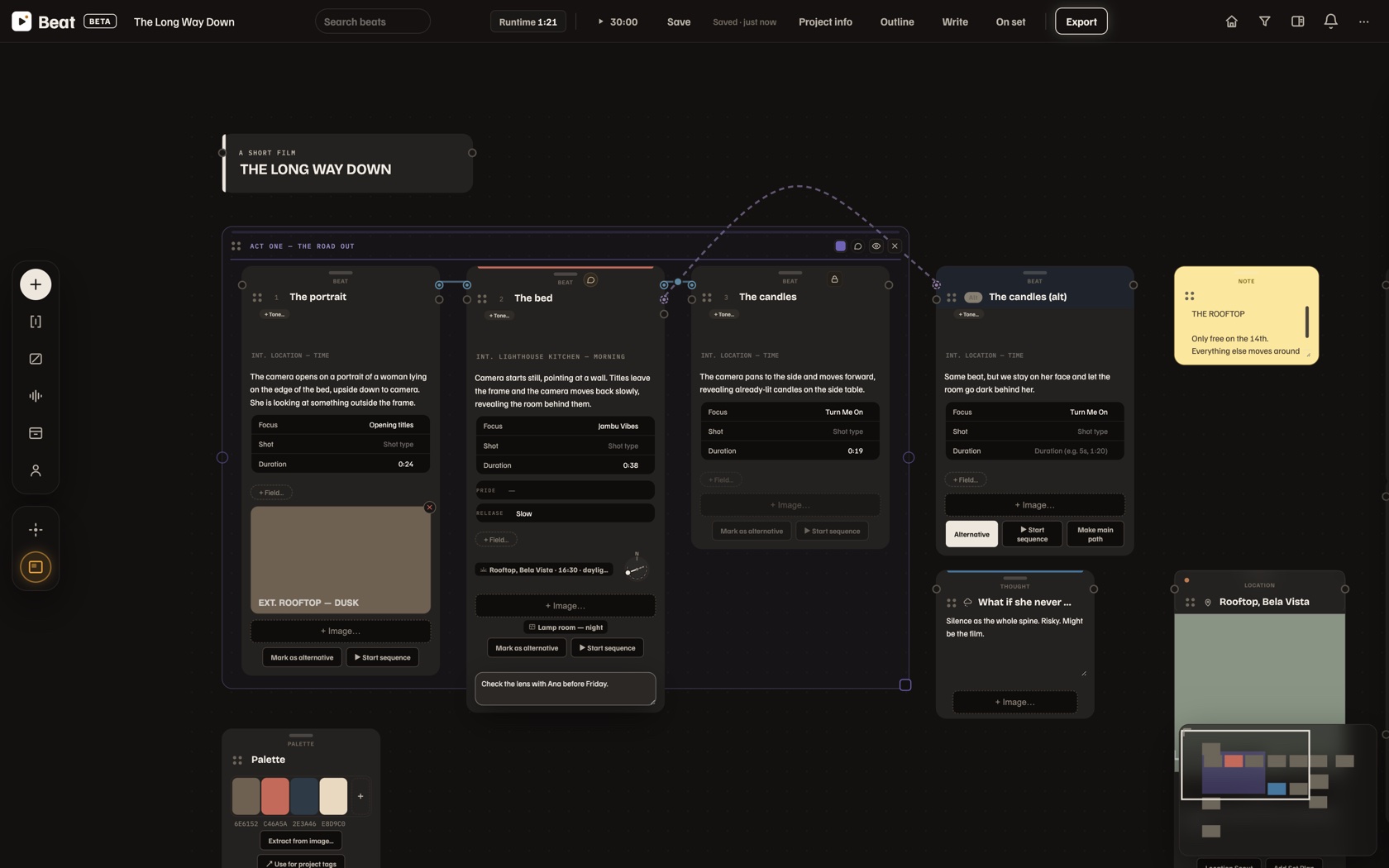
Think in nodes, not documents

An infinite visual board where every idea is a node. Beats, notes, characters, locations and props, all as cards you move, group, connect and @mention.

Beats that branch

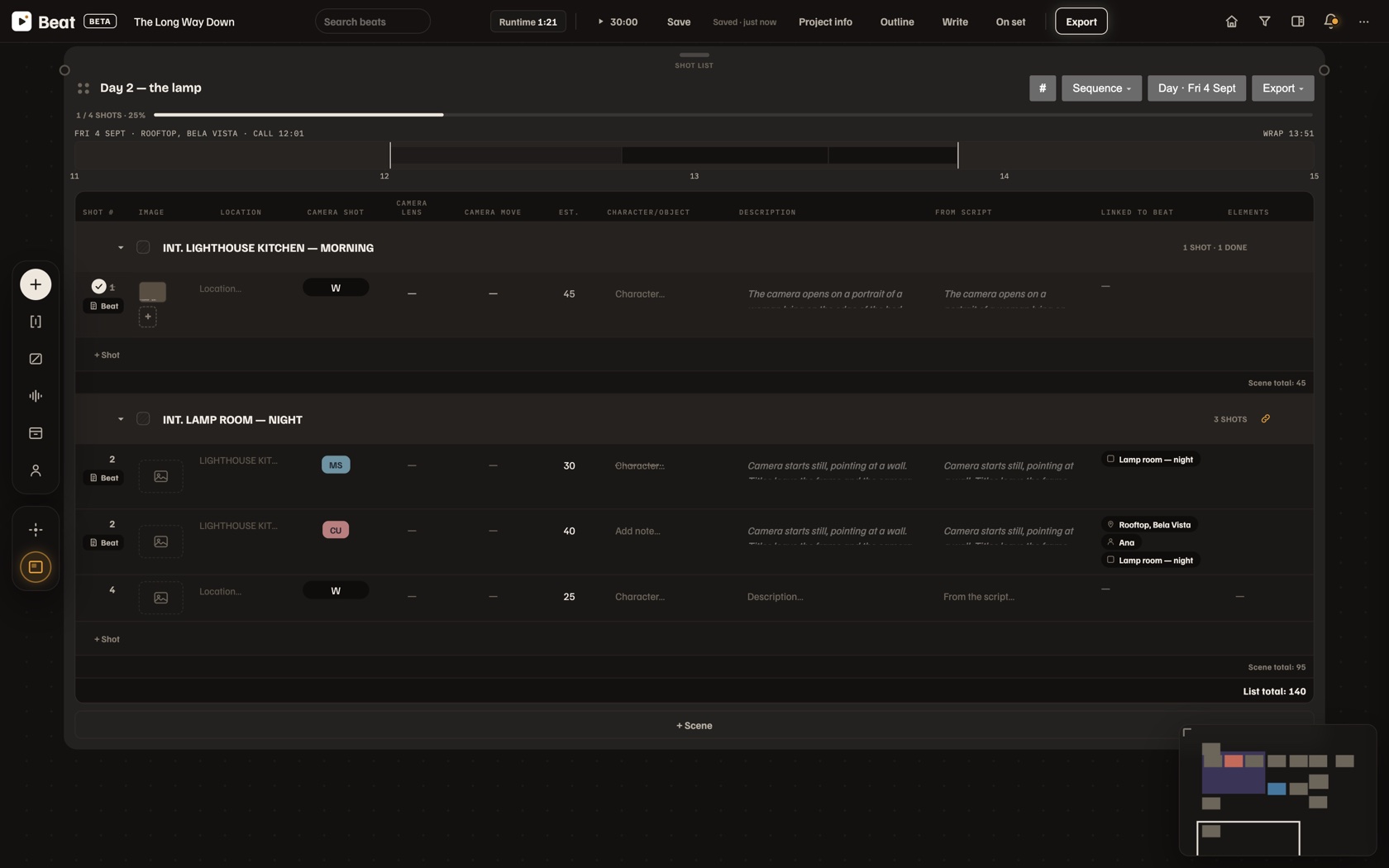
Lay out story moments, link them into a spine, and explore alternate versions side by side, with tones, slug lines, shot type, duration and a live runtime meter. Start from classic structures: three act, Hero's Journey, Save the Cat, the story circle.

Export everything, your way

Hand it off or keep building elsewhere: all your media in tidy folders inside a .zip, a Markdown file of the whole project with selectable prompts built in for any AI chat, a Word document organized exactly as you built it, and PDF overviews and storyboards.

References

Pull references from anywhere.

Drop in a link and Beat grabs video and images from almost any site. A custom video player gives you frame by frame control to lift the exact still or GIF straight into your project's media pool.

Custom player frame by frame Media pool
Key · 5600K Bounce Subject Camera · 35mm 1 m 5.0 × 3.5 m
The Set Plan

The part I'm proudest of.

A full screen, overhead scene planner you attach to any beat. There's no simple way to plan lighting and blocking visually, so I built one that thinks the way a director and DP do on set.

  • Cameras with a real field of view by focal length, and blocking paths with facing at every point.
  • Real fixtures, softbox, fresnel, LED, kino, china ball, practical, with beam falloff, color temperature and intensity.
  • Light that bounces, blocks and passes through bounce cards, flags, diffusion, walls, doors and windows.
  • Real world scale in metres or feet. Set the room size and everything sizes correctly. Export the plan as an image.
Works with Claude

An AI that sees the whole project, via MCP.

One click links Beat to Claude through MCP. Instead of copying and pasting into a chatbot, the AI works on your real project: continue the spine, build a character bible, restructure acts, critique the structure, even read your docs and adjust Set Plans.

Your project Claude via MCP reads · edits
Honest by design

Completely free. Local first.

Free, and never for sale

No price, no business model, no upsell. I built it for myself and I give it away. That is the whole idea.

No account, no tracking

Nothing to sign up for, nothing watched. Open it and work.

You own your files

Every project is a folder on your Mac. Offline and yours, back it up however you like.

Where we are now

The story so far.

Beat is young and moving fast. Here is what is live today, and this list grows with every update.

V1.0currentJune 2026
  • First public release of Beat.
  • Universal build: runs natively on Apple Silicon and Intel Macs.
  • Signed and packaged as a clean .dmg, so it opens in one simple step, with no Apple account needed.
  • The full canvas: story beats that branch, references from almost any link, characters and locations.
  • The Set Plan: an overhead lighting and blocking planner with real cameras and fixtures.
  • Works with Claude through MCP.
  • Local first and free: no account, no tracking, your projects are folders you own.
  • Exports to Markdown, Word and PDF.
Get in touch, tell me what's missing

Beat is for the community, and the best version of it comes from the people who actually use it. I want your honest take: what helps, what breaks, what's missing. Send it my way and it gets better for everyone.

Built by someone who works in storytelling, for storytellers

"I built this tool entirely for myself, and it's completely free. I'm sharing it because I think other people like me could use it too."

— João Lutz

Beat will always be free. If it helped you, you can buy me a coffee.

Download

Get Beat. It's free.

Native macOS · no account · always free, never for sale.

Download Beat from Google Drive Free · universal app for Apple Silicon and Intel · opens in Google Drive, then follow the steps below 206 downloads and counting
Opening it the first time, it takes a minute

How to open Beat the first time

Beat is free and not from the Mac App Store, so the first time you open it your Mac warns you once. It is completely safe. The app is signed and runs on both Apple Silicon and Intel Macs. You do this once, then Beat opens with a normal double click forever.

Step 1. Download Beat and drag it to Applications

  1. Click the button above. It opens the Beat folder in Google Drive in a new tab.
  2. Click Beat.dmg, then the download icon (a down arrow, top right). If Google says it cannot scan the file because it is large, click Download anyway. That warning is normal for any big app.
  3. Open your Downloads folder and double click Beat.dmg. A window opens showing the Beat app next to an Applications shortcut.
  4. Drag Beat onto the Applications folder in that window.

Step 2. Open it once

The first time, your Mac shows a message like Apple could not verify Beat is free of malware. That is the normal prompt for any app made outside the App Store, and it is safe. Here is how to get past it, one time:

  1. When that message appears, click Done, not Move to Trash.
  2. Open System Settings, then Privacy and Security. Scroll down and you will see a line saying Beat was blocked, with an Open Anyway button. Click it.
  3. Confirm with your fingerprint or your Mac password. Beat opens, and from now on it opens with a normal double click.

On older macOS there is a faster way: right click Beat in your Applications folder (or hold Control and click), choose Open, then click Open in the dialog.

Still see “damaged”? (rare now)

That almost always means the download did not finish, or the file got re-compressed along the way. First, simply download Beat.dmg again from the folder, a fresh copy usually fixes it. If it still happens, open the Terminal app (press Command and Space, type Terminal, press Return) and paste this line, then press Return:

xattr -dr com.apple.quarantine /Applications/Beat.app

Then open Beat normally. You only ever do this once.

Prefer to watch someone do it? Short videos: opening an app from an unidentified developer, and if you ever need it, clearing the “damaged” message in Terminal. Still stuck? Email me at joaolutz.mb@gmail.com and I will personally help you get it running.